Crayola Adult Coloring
- 4.3
- Rating
- 10.00K
- Installs
- Free
- Price
 Analysis by App-foxy
I reached for Crayola Adult Coloring on an evening when I wanted something quieter than a game and more engaging than simply watching a video. That first impression still explains its appeal: it gives me a small creative task, but it does not demand that I already know how to draw. The app sits in the art and design category, and Red Games Co. keeps the idea approachable by putting coloring, drawing, and creative relaxation in the same place.
It is free to start, carries an Everyone age rating, and has built a modest audience with a 4.3 average from around 78 ratings and more than 10K installs. Those figures suggest a smaller, more focused app rather than a huge social platform. I think that is useful context for a household deciding whether to try it: this is best treated as a personal creative space on a phone or tablet, not as a shared online community or a replacement for a full digital illustration studio.
How it feels in a real household
The most natural shared-device scenario is a quiet handoff between people. I can imagine one person using it after work, then leaving the device for a child or another adult who wants a different kind of activity. Because the basic idea is immediately recognizable, nobody needs a long explanation before beginning. You choose a coloring activity or move toward drawing, then spend a few minutes making choices rather than learning complicated software.
You May Also Like

 AccuWeather: Weather Radar
AccuWeather Review: A Quick, Clear Forecast for Everyday Decisions
For everyday plans, the best forecast is the one you can understand quickly. AccuWeather makes rain timing, radar, and local conditions easy to act on, with a few trade-offs.

 Hill Climb Racing
Why Hill Climb Racing Still Turns Crashes Into One More Run
A tiny car, a bumpy hill and one more upgrade: Hill Climb Racing keeps resurfacing because its simple chaos makes every near-miss feel personal.

 AliExpress - Shopping App
AliExpress Makes Global Shopping Feel Personal, but Shoppers Bear the Risk
AliExpress turns a global marketplace into a pocket-sized discovery engine. Its reach is useful, its shopping loop compelling, and its trade-offs easy to miss.

 Lords Mobile: Kingdom Wars
Lords Mobile Is a Kingdom-Building Routine, Not a Quick Match
A case-by-case verdict on the building, battles, device demands, and social commitments that make Lords Mobile rewarding for some players and exhausting for others.

 PDF Scanner app - TapScanner
TapScanner Makes Paperwork Easier to Capture, Check, and Share
TapScanner makes scanning with a phone feel less like a rescue operation and more like a dependable step in getting work done. Its capture tools are useful, though not flawless.

 Block Blast!
Block Blast! Shows How Much a Puzzle Game Can Leave Out
A quiet grid game shows why puzzle players increasingly value instant clarity, repeatable skill and low-pressure play—and where the genre still needs to catch up.
More From Our News Desk
View All News


That simplicity is especially helpful when the device lives in a common room. A family tablet often has to serve several purposes, and an art app that can be opened for a short session is easier to share than a demanding creative program. One person might use it to settle down before bed, while another uses it during a waiting period or a rainy afternoon. I would not describe the experience as competitive. Its value comes from giving each user a low-pressure activity that can be picked up and put down.
There is also a useful difference between sharing the physical device and sharing the creative result. If several people use the same screen, I would establish a simple routine: each person finishes or pauses before handing it over, and nobody changes another person’s work without asking. That is not an app feature; it is a practical household rule. The app works well with this arrangement because the activity itself is easy to understand, but the responsibility for keeping sessions separate belongs to the users.
For a parent, caregiver, or roommate, this makes the app appealing as an occasional shared activity rather than a system for managing several profiles. I would not install it expecting detailed account boundaries, family dashboards, or a carefully separated workspace for every person. The more people depend on independent histories or private collections, the more important it becomes to check how the app behaves on the particular device before making it the household’s main art tool.
A calm first session instead of a technical lesson
My first recommendation is to treat the opening session as a test of comfort, not productivity. Start with coloring rather than trying to create a finished drawing immediately. Coloring gives a clear target and lets you learn the touch response, the available creative choices, and the general rhythm of the interface without the pressure of a blank canvas.
After that, switch to drawing only when you feel curious. This two-step approach is more useful than jumping straight into every option. It also works well when introducing the app to someone who says they are “not artistic.” A coloring activity offers structure, while drawing leaves more room for experimentation. The two modes serve different moods, and I found that recognizing that difference makes the app feel less like a test of skill.
On a shared tablet, I would also decide in advance whether people are allowed to use purchases. The app is free, but its in-app purchases range from $0.99 to $59.99 per item. That is a meaningful gap between the entry point and the highest listed item, so I would not hand the device to a child without first setting a clear household rule around buying. The app’s Everyone rating describes its age suitability, but it does not replace a parent’s decision about spending or supervised use.
That boundary matters because creative apps can encourage browsing. A user may begin with a quick coloring session and then become interested in additional content or tools. I prefer to decide who can approve purchases before anyone starts, especially on a device used by several people. If the tablet belongs to the family, the practical question is not only whether the app is suitable; it is also who controls the payment path.
Keeping sessions separate without making the app feel formal
One of the better ways to coordinate use is to give each person a recognizable routine. An adult might use it for ten minutes after dinner, while a child uses it on a weekend afternoon. Another option is to let each user choose a different style of activity, with one person coloring and another drawing. These small distinctions reduce accidental overlap without turning a relaxing app into a household administration project.
I would avoid promising that every person’s work will automatically remain perfectly separated. The safest approach is to look at the app on the device you plan to share and see how it handles saved work and returning sessions. Since the experience is designed around personal creativity, users may naturally assume their projects are private or independently organized. That assumption should be checked rather than taken for granted.
This is also where a phone and a tablet feel different. A phone is convenient for one person’s short sessions, but a tablet is more comfortable for drawing and easier for two people to look at together. The trade-off is that a tablet is more likely to be shared, so coordination becomes more important. I would choose the device based on who will use it most often, not simply on screen size.
A useful household habit is to finish a session with a clear stopping point. Instead of leaving the app open in the middle of an unfinished activity, pause after completing a section or save the work in whatever way the current version supports. That makes the next handoff less confusing. It also prevents the common shared-device problem where someone opens an app and assumes the visible project belongs to them.
Age suitability and the trust question
The Everyone rating makes the app broadly approachable from an age perspective, but “suitable for everyone” and “appropriate for every situation” are not identical. Younger users may need help understanding the difference between a free download and optional spending. They may also need a reminder that creative work can be personal even when the device is communal.
I like the app for supervised family creativity because the central activity is constructive and easy to explain. A parent can sit nearby, choose a short session, and talk about color choices without needing to turn it into a lesson. That said, I would not use the age rating as a reason to remove all supervision. Shared devices still involve purchases, saved work, and ordinary questions about whose turn it is.
For older children and adults, the app’s relaxed structure can be a welcome break from achievement-driven games. There is no need to compete with another person in the room, and the activity can be judged by how satisfying it feels rather than by a score. I found that especially useful when I wanted to make something without committing to a serious drawing project.
However, a person who wants firm privacy boundaries should be more cautious. The app may be perfectly pleasant for personal use, but a shared device creates its own limits. If confidential creative work, separate histories, or detailed family permissions are essential, I would look for an art tool built around explicit accounts or profiles instead. Crayola Adult Coloring is easier to approach than those systems, but that convenience can come with less structure for a multi-user household.
What makes it different from ordinary coloring apps
Compared with a basic coloring app, this one has a broader creative identity because it includes drawing as well as coloring. That matters when my mood changes. A purely coloring-focused app is often better if I want a predictable, guided activity with no blank space. Here, I can begin with structure and then move toward a more personal result when I feel ready.
Compared with a full illustration app, it is much less intimidating. Professional drawing tools usually win on control, layers, precision, and detailed editing. They are the better choice for someone producing artwork for work, school, or a serious portfolio. I would not choose this app when I need exact brush behavior or a complex project workflow. Its strength is the short, friendly session, not technical depth.
It also differs from casual mobile games because its reward is largely self-directed. There is no need to master a level or wait for a turn. That makes it suitable for a person who wants screen time with a creative purpose, although someone who needs constant goals and feedback may find it too open-ended.
The Crayola identity gives the experience a familiar creative tone, but I would still judge it by how well it fits your habits. If you already own coloring books and prefer paper, the app cannot reproduce the feel of physical pencils or the satisfaction of filling a real page. Its advantage is convenience: the device is already available, and you can change direction without carrying supplies.
Small techniques that improve the experience
I found three practical habits more useful than trying to rush through every option. First, I choose a limited color mood before beginning. Working with a small group of related colors keeps the result coherent and makes the session calmer. It also prevents the common problem of spending more time browsing choices than actually coloring.
Second, I use drawing as a follow-up rather than a replacement for coloring. After completing a structured page, I can sketch a small variation or add a personal idea. This gives the session a natural beginning and ending. It is a better workflow for a hesitant beginner than opening a blank drawing area and wondering what to make.
Third, I keep household sessions deliberately short when the app is being shared. A ten-minute turn is easier to coordinate than an undefined promise to stop “soon.” It also protects the relaxing quality of the activity. When a creative app becomes another source of arguments over screen time, its main benefit is lost, regardless of how enjoyable the tools are.
Another useful trade-off is choosing between a phone and a larger screen. A phone is ideal for private, spontaneous use, particularly when I have only a few minutes. A tablet gives the artwork more breathing room and is more comfortable for longer drawing, but it is also more likely to invite spectators or interruptions. I would choose the phone for personal decompression and the tablet for guided family sessions.
Finally, I would update expectations alongside the app. The current version is 1.3.2, and creative apps can change their layout or available options over time. If several people use the same device, it is worth checking the interface after an update before assuming that everyone will find their way around immediately. That small check avoids confusion during a shared session.
Where the free starting point works, and where it may not
The free price is a strong reason to try the app without committing immediately. Someone who is curious about digital coloring can see whether the basic experience suits them before deciding whether it deserves regular space on the device. For a household, that makes the first conversation easier: install it, try a short session, and decide together whether it is genuinely being used.
The in-app purchase range changes the calculation for heavier users. A person who wants to explore more of what the app offers may spend considerably more than a casual user, depending on which items they choose. I would keep the free starting point in mind and avoid assuming that every creative option is included at no cost. This is particularly important when children use the same device.
In my experience, the app makes the most sense for people who value a low-pressure creative pause. It is a good fit for a beginner, a casual colorer, an adult who wants a screen-based way to unwind, or a family that can agree on turn-taking and purchase rules. It is less convincing for a professional artist, a user who needs robust project management, or a household that requires clearly separated accounts.
That distinction is not a criticism of the app’s purpose. It is simply a matter of choosing the right tool. A dedicated illustration app offers more control, while paper offers a more tactile experience. A simpler coloring app may be preferable for someone who never wants to draw. This app earns its place between those alternatives by combining guided coloring with an invitation to experiment.
My household verdict
After using it as a personal relaxation app and considering how it behaves in a shared-device setting, I see Crayola Adult Coloring as an approachable creative companion rather than a complete family art system. Its strongest quality is the low barrier to entry: I can begin without drawing experience, move between coloring and drawing, and stop without feeling that I abandoned a demanding project.
Red Games Co. has positioned it well for casual use, and the Everyone rating supports its broad accessibility. Still, I would pair the installation with two simple decisions: who may make in-app purchases and how unfinished work will be treated when several people share the device. Those rules solve more practical problems than expecting the app itself to organize the household.
My recommendation is to try it if you want a calm, flexible art activity that works in short sessions. Start with coloring, test drawing later, and use a shared tablet only after agreeing on turns and spending. If you need private profiles, professional drawing controls, or the physical feel of real materials, choose a different option. For everyone else, this is a pleasant way to turn a spare few minutes into something creative without making the experience feel like homework.
FAQs for Crayola Adult Coloring
01What is Crayola Adult Coloring?
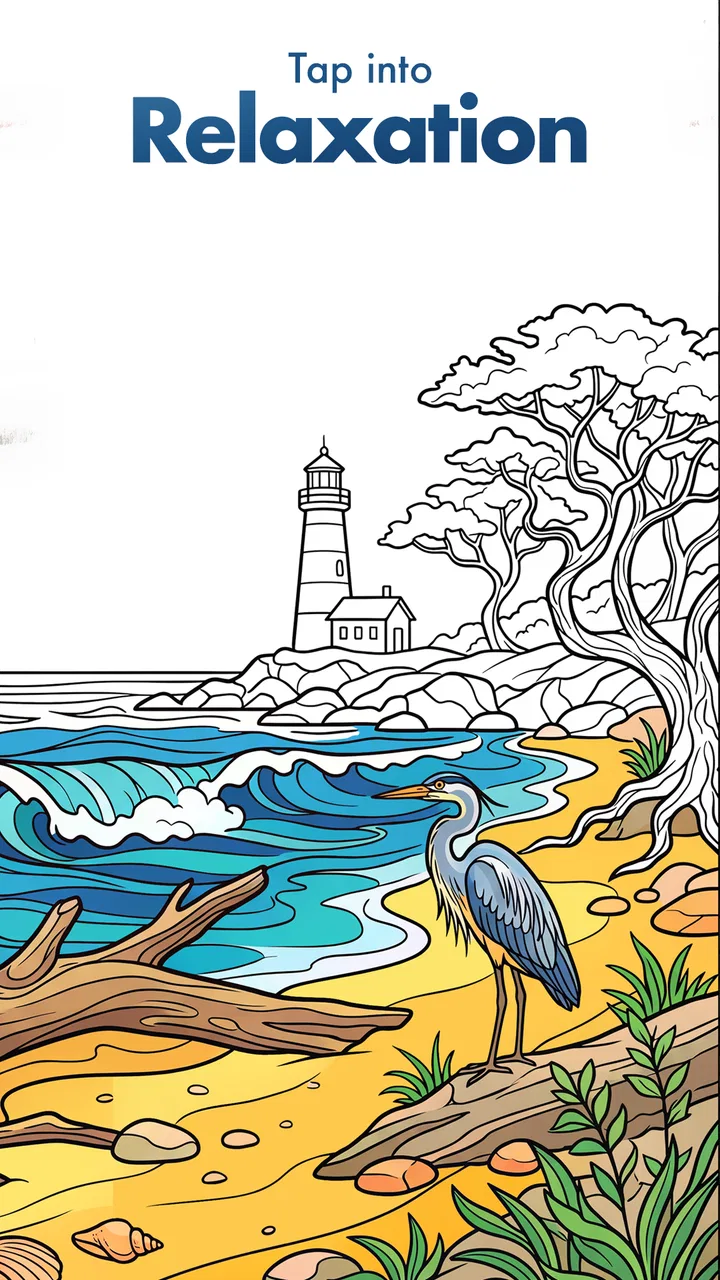
Crayola Adult Coloring is a relaxing digital coloring app designed for older users who enjoy creative activities on a phone or tablet. It includes themed coloring pages, a selection of colors, and tools that make filling detailed illustrations easier. The app is suitable for short relaxation sessions, casual creativity, or anyone who wants a portable alternative to traditional coloring books.
02Is Crayola Adult Coloring free to download and use?
The app can generally be downloaded at no initial cost, but some coloring pages, tools, or collections may require in-app purchases or a subscription, depending on the version and platform. Before downloading, check the current store listing for pricing, trial conditions, and renewal details. If a subscription is offered, review cancellation instructions carefully to avoid unexpected charges.
03Does Crayola Adult Coloring work without an internet connection?
Some basic features and previously available coloring pages may work offline, but the exact experience can depend on the app version and device. Internet access may be required for downloading new artwork, restoring purchases, synchronizing content, viewing advertisements, or using account-related features. It is best to open the app online first and download any content you want available while traveling.
04What features does Crayola Adult Coloring offer?
Crayola Adult Coloring typically focuses on detailed illustrations, broad color choices, and simple touch controls for filling artwork. Depending on the release, users may find themed galleries, color palettes, undo and redo options, zoom controls, and tools for adding finishing touches. Completed designs can often be saved or shared, although available features may vary between Android and iOS.
05Is Crayola Adult Coloring suitable for children?
Although coloring itself is family-friendly, the app is specifically presented for adults and may include detailed artwork, advertising, in-app purchases, or account features that parents should review. Children can use it with supervision, but guardians should check the age rating, privacy information, and purchase settings on the relevant app store. Parental controls are recommended if the device is shared.
Pros
- Wide range of relaxing coloring pages for different interests
- Simple controls make coloring comfortable for beginners
- Bright Crayola-inspired colors create attractive finished artwork
- Useful zooming helps with filling small
- detailed areas
- Suitable for short creative sessions or longer stress-relief breaks
Cons
- Many pages
- colors
- or tools may require in-app purchases
- Some coloring actions can feel imprecise on smaller phone screens
- The app may become repetitive for users seeking more gameplay
- Saving or sharing artwork may depend on account or device permissions
- Ads or promotional prompts can interrupt the coloring experience

Crayola Adult Coloring
Gallery